How to make a transparent sprite sheet without green fringes
The hard part of transparency is not deleting pure green—it is handling semi-transparent edges. Anti-aliased pixels contain both subject and background colors; a simple threshold leaves green fringe or erases interior detail.
Verified by the FrameSprite Workflow Lab · 2026-08
Short answer
Use a solid background that strongly contrasts the character and sample the key from empty corners. Tune tolerance to remove the outer background, then despill semi-transparent edges. Normalize canvases and alpha bounds, pack as RGBA PNG, and inspect once against dark and light checkerboards.
Reproducible steps
- 01
Choose a non-conflicting key color
If the character contains substantial green, use blue or red instead. The key must be flat, shadowless and fill the complete background.
- 02
Sample from empty corners
Do not assume the background remains #00FF00 after video encoding. Sampling multiple empty corners captures small compression shifts.
- 03
Separate alpha removal from despill
Use one pass to determine alpha and a second to reduce the key-color channel in edge pixels. Separate controls preserve the silhouette while removing fringe.
- 04
Inspect on both dark and light backgrounds
Dark backgrounds reveal bright spill; light backgrounds reveal dark halos and holes. Inspect fingers, hair, weapon tips and translucent effects.
- 05
Pack as RGBA PNG
GIF transparency is limited and unsuitable for production assets. Preserve alpha and 1–2px gutters per cell, export PNG, then slice in-engine.
A tested example
The sample passed through the current Canvas keying path and retains real partial-alpha edges.
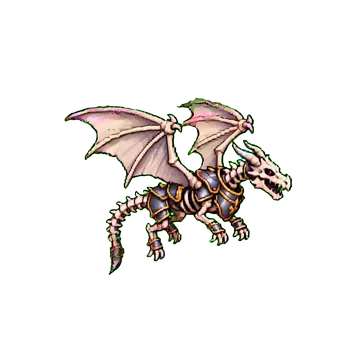

Reproducible details
- Channels
- RGBA
- Key
- Corner sampled
- Edges
- Despill
WebP RGBA
Transparency diagnosis
| Symptom | Likely cause | Fix |
|---|---|---|
| Green fringe | Alpha removal without despill | Reduce green in semi-transparent edge pixels |
| Transparent holes inside the character | Tolerance too high or subject shares the key color | Lower tolerance or switch to blue/red key |
| Edges look jagged | A hard threshold removed all partial alpha | Keep a soft alpha transition and despill only |
Frequently asked questions
- Why does the download still look like it has a background?
- Many viewers display transparency over white or black. Confirm the file is RGBA PNG/WebP and inspect in an editor with a checkerboard transparency view.
- Can a transparent sprite sheet use WebP?
- Yes, but PNG remains the most reliable format across engines and pipelines. WebP is better for web previews or engines with explicit support.
- How should glow and smoke be keyed?
- Translucent effects mix heavily with the background. Use softer tolerance and despill, or export character and effects as separate layers.
Next in the workflow
Run the workflow with your own asset
The browser tool needs no account; move into the character workspace only when you need a new action.
Open the free tool